MCQ
Q.
When data is in list format _________ can be used to represent in neatly in MS Word.
Correct Answer: B
The correct answer is Bullets.
 Key Points
- When data is in list format Bullets can be used to represent it neatly in MS Word.
- Microsoft products allow you to organize content using bulleted and numbered lists.
- You can also create customized lists by editing the bullet/number font, color, alignment, and icon style.
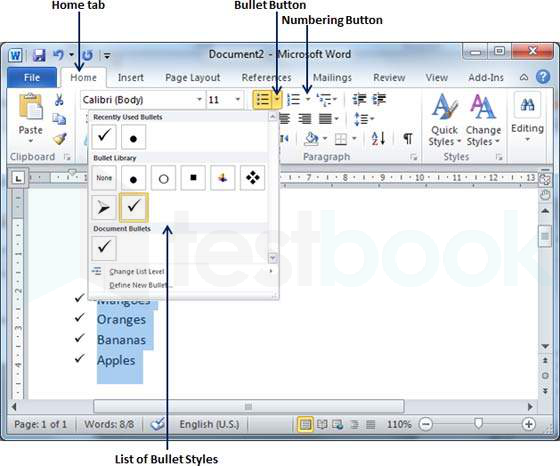
- Within your Microsoft document, place your cursor or highlight the text where you wish to insert a bulleted list.
- Under the [Home] tab in the “Paragraph” section, click the [Bullets] drop-down menu.
- Choose a bullet style or select "Bullets and Numbering” to create a customized bullet style.
- To change the alignment of the bulleted list, from the "Paragraph" section, click the [Aligh Text] drop-down menu.
 Additional Information
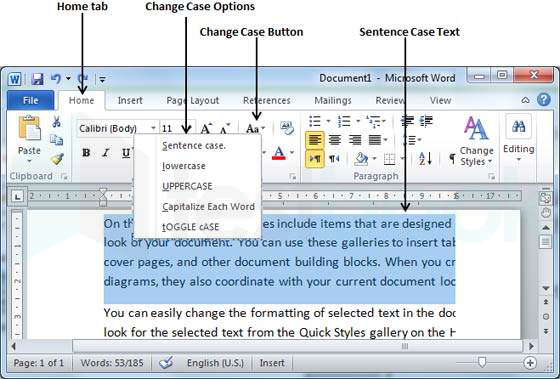
- Change Case
- You can also capitalize a character you are typing by pressing and holding the SHIFT key while you type.
- You can also press the CAPS LOCK to have every letter that you type capitalized, and then press the CAPS LOCK again to turn off capitalization.
- Spacing between Lines
- Following are the simple steps to adjust the spacing between two lines of the document.
- Step 1
- Select the paragraph or paragraphs for which you want to define the spacing.
- You can use any of the text selection methods to select the paragraph(s).
- Step 2
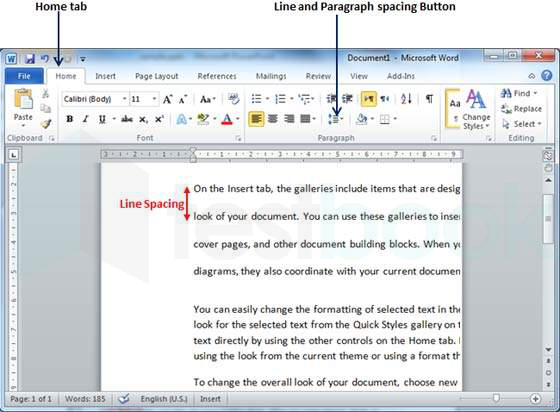
- Click the Line and Paragraph Spacing Button triangle to display a list of options to adjust the space between the lines.
- You can select any of the options available by simply clicking over them.